What Your Clients Actually Get When You Run on Apeiron CAD
Every security contract is renewed or lost on a question the client rarely asks out loud: am I getting what I pay for?
Most guard companies answer it with a binder at the post and a phone call when something goes wrong. That works until the night the client needs proof and the binder is in a truck. This post is about what the answer looks like when your company runs on Apeiron CAD. It is written for owners, but if a prospect asks what they will actually see, send them this.
1. Proof Someone Was There
The first thing a client wants is the thing they can least easily get: evidence that a guard was on their property at the times they are paying for.
On Apeiron CAD, every guard clocks in on their phone and the clock-in is a GPS-verified time record. Every checkpoint they scan is timestamped, whether it is a QR sticker on the loading dock or a geofenced zone the phone checks into on its own. Every status change lands in the same timeline. None of it is typed up later from memory, so none of it has to be reconstructed.
What the client sees is coverage: which hours their site was staffed and which rounds were completed. What they never see is where an individual guard is. The live map is yours, for dispatch. A client gets proof of presence without a person's location, and that line is built into the product, not a setting.
One honest limit: this is proof a guard was there, not proof they were paying attention. The notes a guard types at clock-out do that part, which brings us to the report.
2. A Report They Can Read the Next Morning Without Asking
The daily activity report is the document the contract quietly depends on, and at most companies it is the last thing done on a shift and the first thing forgotten.
When a guard clocks out on Apeiron CAD, the report assembles itself from the shift's own data: the verified clock times, the checkpoint scans, the status changes and the notes the guard typed. It lands on your letterhead, formatted like a document that belongs on a client's desk rather than a screenshot from an app.
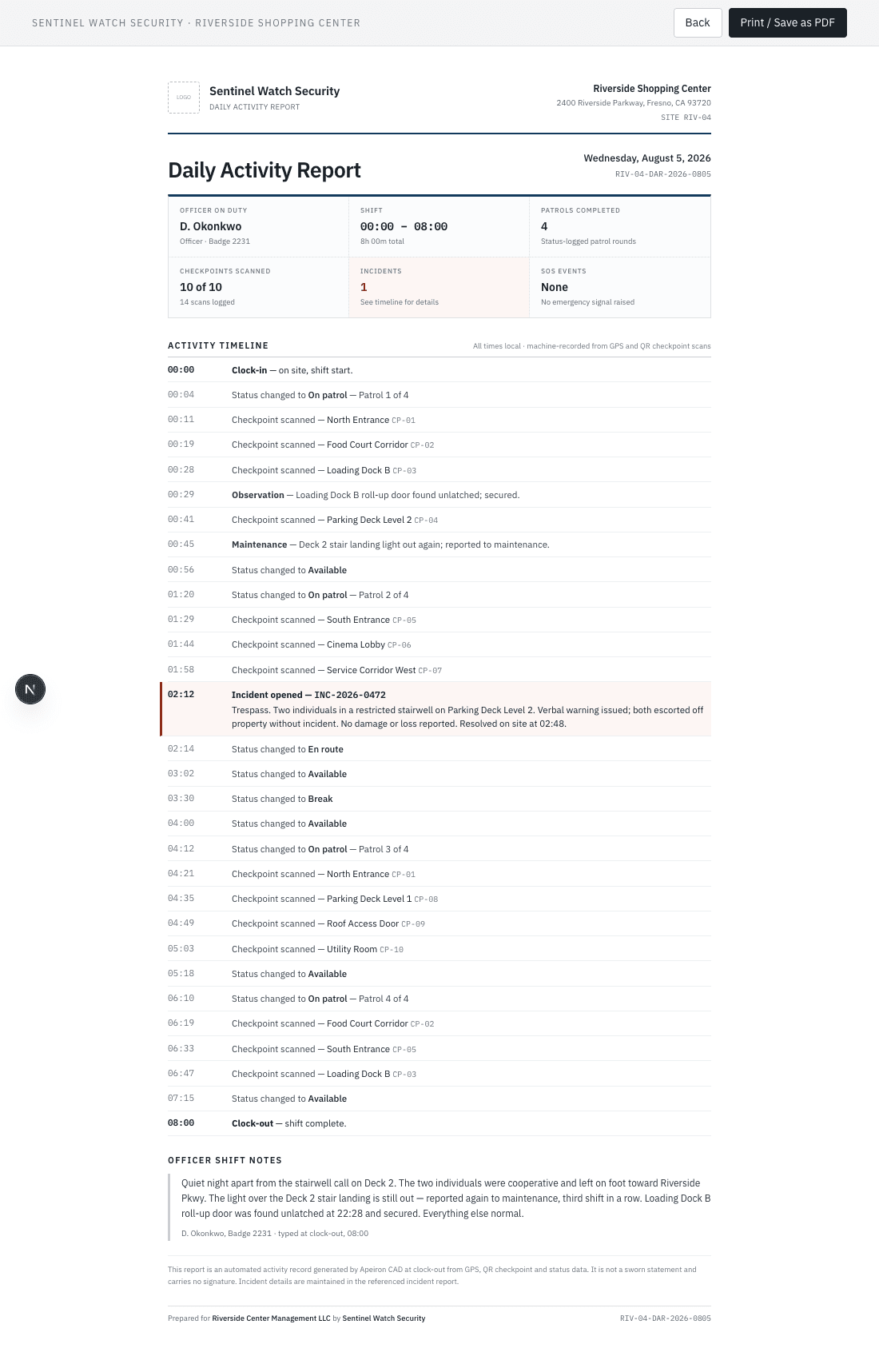
Then it goes to the client's portal, if you say so. There are two switches, one for the whole company and one per client, and both are off until you turn them on. So the report never reaches a client before you have decided that client should get it. Once it is on, the report is in their portal before your guard is out of the parking lot, and nobody on your team has to remember to send it.
3. A Way to Check Without Calling You
The phone calls a client makes at 7 a.m. are rarely about a problem. They are about not knowing. Did anyone show? Did the rounds happen? Was that door checked?
Apeiron CAD gives each client a login to a portal that shows only their own sites. They see coverage hours, the incidents you choose to share, patrol reports and daily activity reports. They can request a service visit, request extra coverage, or sign off on a report they have read. None of those actions changes anything on your side without you; they arrive as requests your dispatcher deals with.
You decide how much each client gets. There are three levels, sold as part of the contract:
- Visibility: coverage and reports.
- Interactive: adds requests and messaging with your dispatch.
- Premium: shows every incident at their sites, not only the ones your staff mark for sharing.
A small client and your biggest account do not have to see the same thing. Put the login link on your own website. Inside, every report carries your logo and your colours. The login page itself is ours, shared by every company on the product, and that is the only place a client sees our name.
4. A Record That Holds Up When Something Goes Wrong
The night something happens is the night a contract is really tested. A slip and fall, a break-in, a confrontation at the gate. What the client wants then is not a promise; it is a record written at the time, signed, and never quietly edited.
Incident reports on Apeiron CAD carry photos taken on the spot, the guard's own signature drawn on the phone, and a supervisor's sign-off before anything reaches a client. Every action on an incident lands in a log that cannot be quietly edited afterwards. If a guard is staring at a blank screen at 2 a.m., an assistant can draft the first pass from their notes; the guard still reads it, fixes it and signs it, and the guard is always the one who signs off.
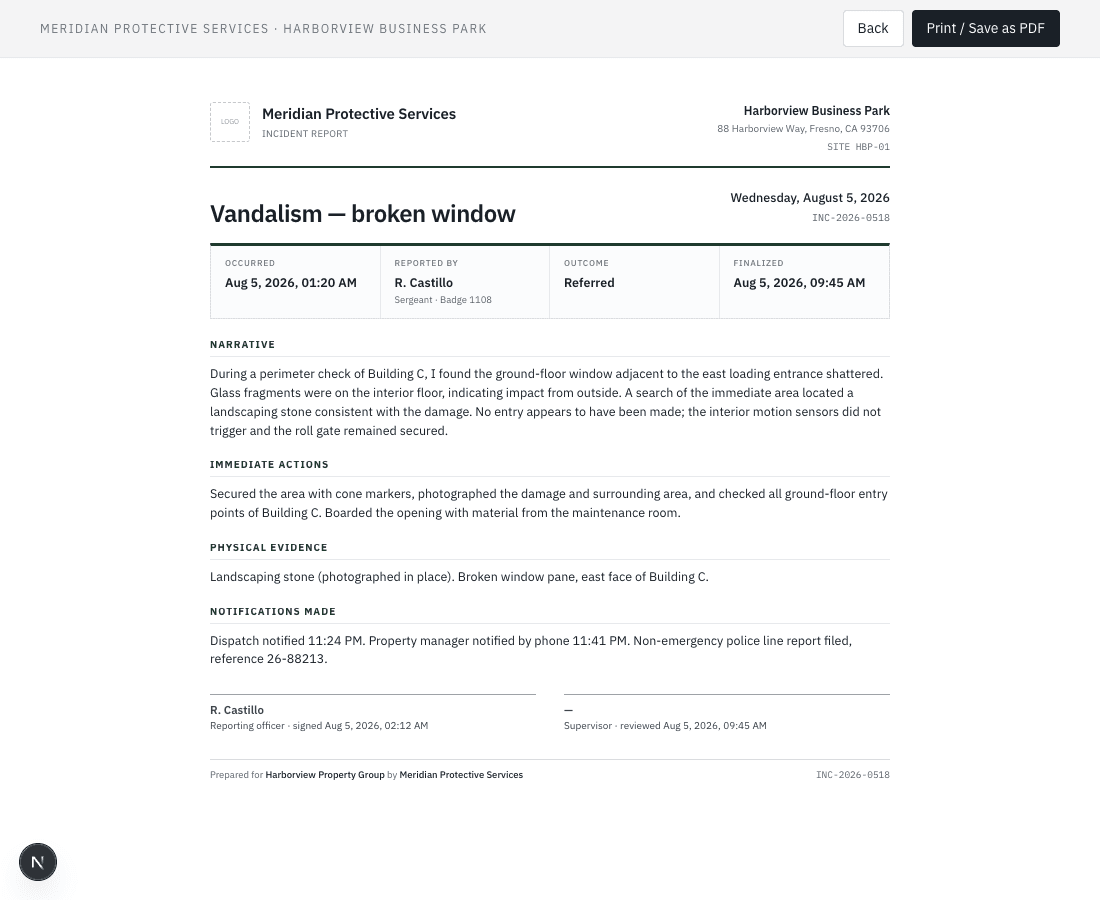
For the client, that is the difference between “we are pretty sure” and documentation they can give their insurer.
The Part Clients Care About but Never Mention
Your clients want proof; your guards want to not be followed home. Both are right, and a product that ignores the second quietly loses the first, because guards who feel tracked off duty delete the app and the proof stops.
Apeiron CAD collects a guard's location only while they are clocked in. It stops at clock-out and the old coordinates are deleted after 30 days, and both of those rules live in the database, where no setting can switch them off. Your guards can read that promise in the app. A crew that trusts the app keeps it installed, and a crew that keeps it installed keeps producing the record your clients are paying for.
How to Use This in the Next Bid
Show the portal on the first walkthrough, not the second. Open a report with the prospect's name at the top and let them read one. Then set the two switches for that client on day one, so their first morning report is waiting before they think to ask.
Companies up to 25 guards run the first 90 days at $99 a month, then it is flat by size: $149 up to ten guards, $299 up to twenty-five, $499 up to fifty. Month to month, no setup fee, and everything on this page is already in the product.
Rather see it than read about it? The demo is fifteen minutes on the real board, and the pricing is all public.