How to Write a Security Guard Daily Activity Report (With a Real Example)
The daily activity report — the DAR — is the one document every security contract quietly depends on. It's what your client's property manager reads over coffee, what an insurance adjuster subpoenas after a slip-and-fall, and what decides whether “we had a guard on site” is a provable fact or your word against the claimant's.
And at most companies, it's still a half-legible form filled in from memory at 6 a.m.
This guide covers what a DAR needs to contain, the mistakes that get reports dismissed (by clients and by courts), and what a good one looks like. The example at the bottom is a real report generated by our software, but everything before it applies no matter how you write yours.
What a Daily Activity Report Is For
A DAR serves three readers at once:
- The client wants proof they're getting what they pay for: a guard who showed up on time, made the rounds, and paid attention.
- Your own operation needs continuity. The swing shift should know the loading dock latch was broken before they walk their first round.
- The record (legal, insurance, licensing) needs an account that was written at the time, not reconstructed later.
A report that satisfies the third reader automatically satisfies the first two.
What Every DAR Must Include
- Who and where: Guard name and badge, site name and address, and the client it's prepared for.
- Exact shift times: Clock-in and clock-out, not “2200–0600.” If your times are always perfectly round, a reader assumes they're invented.
- Patrols and checkpoints: Each round with exact times. If you use checkpoint scanning, note which points were hit and which were missed.
- Events in a timeline: Status changes, observations, visitor contacts, and incidents in chronological order. A timeline reads as evidence; paragraphs read as a story.
- Incidents referenced, not retold: The DAR notes an incident happened and points to the incident report number. The full narrative, photos, and notifications live in that separate document.
- The guard's own words: A short notes section for the burnt-out light, the unlatched door, or the car that circled twice. This is the part clients actually quote back to you.
The 5 Mistakes That Sink Reports
- Writing it at the end of the shift. Eight hours of events compressed from memory produces the same report every night: “patrolled, all secure.” Courts call this a credibility problem; clients call it a reason to shop around.
- “All secure” as the whole entry. If nothing happened, say what you checked: doors tried, lots walked, alarms armed. “Nothing to report” proves presence only if it's surrounded by specifics.
- Untraceable edits. A report that can be quietly rewritten after the fact is worthless as a record. Ink over pencil, or software with an audit trail — either way, changes must show.
- Opinion dressed as observation. “Subject appeared intoxicated” invites cross-examination. “Subject was unsteady, slurring, and smelled of alcohol” is an observation.
- The report that never reaches the client. A DAR that sits in a binder at the post is a formality. The operational win is the client reading it the next morning without having to ask for it.
What a Good DAR Looks Like
Here's a real one. This report was assembled automatically at clock-out from the shift's own data — GPS-verified clock times, QR checkpoint scans, status changes, and the notes the guard typed on their phone — straight onto the security company's letterhead.
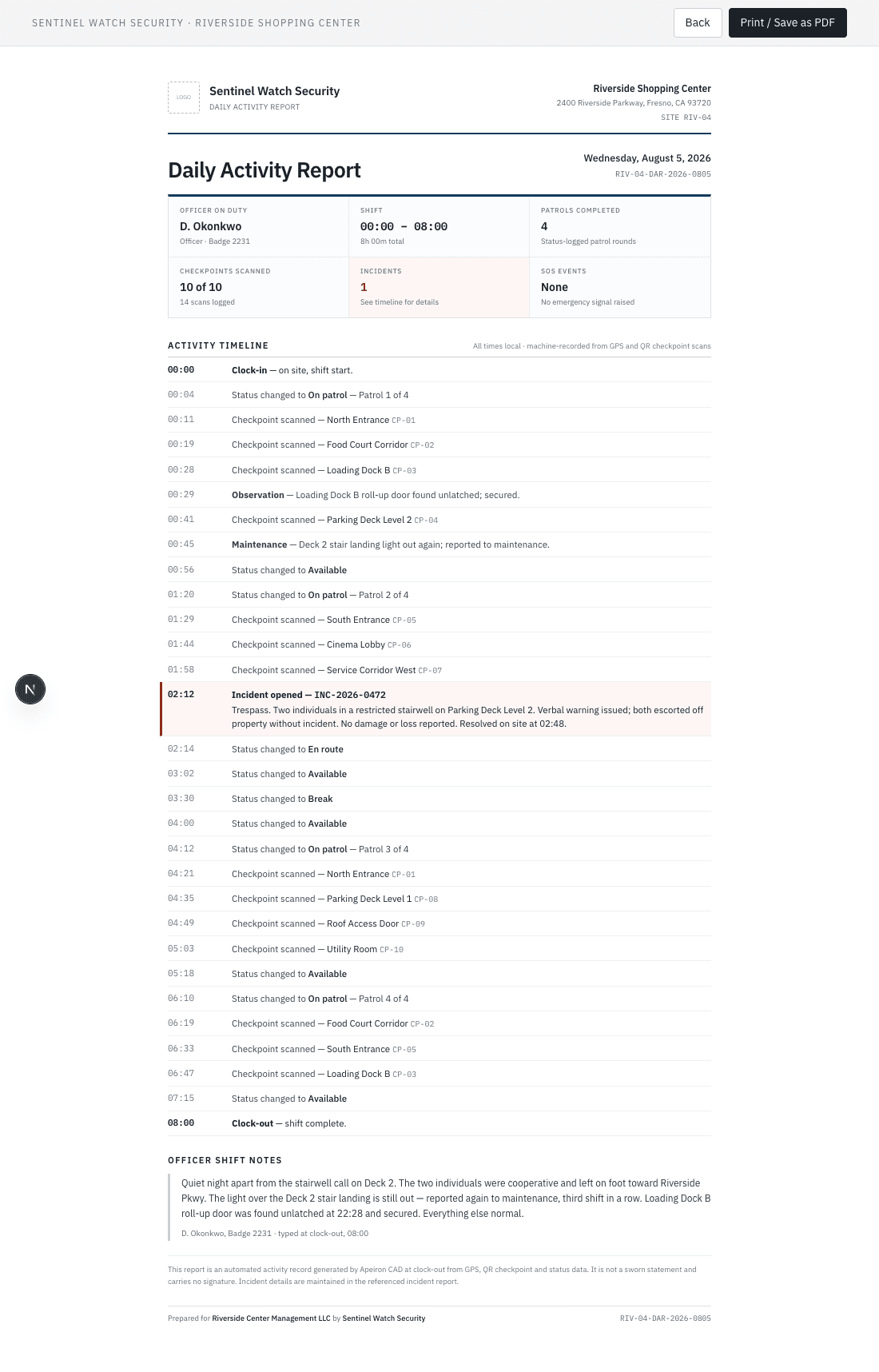
Notice the structure does the work: a summary strip up top for the property manager's 30-second read, the full timestamped timeline underneath for the record, and the officer's notes clearly separated from the machine-recorded events. The one incident that night is flagged in red and points directly to its own report number.
Automating It (What Changes and What Doesn't)
Software doesn't change what belongs in a DAR — it changes when it gets written.
When the timeline builds itself from clock-ins, checkpoint scans, and status changes as they happen, the “write it from memory at 6 a.m.” problem disappears. The guard's only job is the part software can't do: their observations.
In Apeiron CAD, the guard types those notes at clock-out, the report assembles on the company's letterhead, and it publishes instantly to the client's portal — before the guard is even out of the parking lot.
However you produce yours — carbon paper, spreadsheet, or software — the standard is the same: written at the time, specific enough to be evidence, and in the client's hands by morning.
Tired of chasing down handwritten reports at the end of every shift? See how Apeiron CAD automates your dispatching and reporting today.